DJI Flip vs DJI Neo 2: Which Pocket Drone is Better for Travel Creators?
Dipon | May 2026
Table of Contents
- Understanding What You’re Actually Comparing
- Comparison Table
- Camera Quality: Where the Real Price Gap Lives
- Flight Time and Battery: 31 Minutes vs ~19 Minutes
- The Timelapse Creator’s Perspective: Why the Flip Wins Here Specifically
- Obstacle Avoidance and Safety: The Neo 2’s Biggest Advantage
- Portability and Travel Reality
- Who Should Buy Which Drone: The Decision Framework
- Complete Travel Kit: Everything You Need to Fly
- Read Next on Aero Timelapse
- Frequently Asked Questions
- Conclusion: Make the Call and Get Flying
Affiliate Disclosure
This guide contains affiliate links. Purchases made through these links support Aero Timelapse Studio at no additional cost to you. I only recommend products I personally use or carefully research. As an Amazon Associate I earn from qualifying purchases.
You’ve done your research. You know you want something small, light, and ready to fly the moment you arrive at Lago di Como or pull over on the Alb to catch that low fog rolling across the Swabian hills. You also know there are two obvious contenders right now — the DJI Flip and the DJI Neo 2 — and they look almost identical on paper. Both sit under 249g. Both shoot 4K. Both have prop guards. And then you see the price difference: roughly €200 apart. That gap has to mean something, and it does. By the end of this article you’ll know exactly which drone is right for your specific use case, what you’ll gain and what you’ll give up, and what to buy alongside it so you’re ready to fly the day it arrives.
Quick Answer
The DJI Flip is the better drone for travel creators who prioritise footage quality: its 1/1.3-inch sensor, 3-axis gimbal, 10-bit D-Log M colour profile, and 31-minute battery make it a legitimate creative tool in a pocketable body. The DJI Neo 2 wins for absolute portability and crash safety: at 151g with omnidirectional obstacle avoidance and LiDAR, it’s the drone you’ll actually take everywhere without thinking twice. If your content ends up on YouTube, Instagram Reels, or stock platforms and you want room to colour grade, get the Flip (around €429). If you want the most forgiving, go-anywhere, no-fuss flying experience — or you’re a complete beginner who hasn’t flown before — the Neo 2 at around €229 is the smarter first buy. There is no bad choice here; there is only the wrong tool for your workflow.
DJI Flip vs DJI Neo 2: Understanding What You're Actually Comparing
These two drones look similar at a glance — small, guarded props, beginner-friendly, DJI branding — but they were designed with fundamentally different pilots in mind. Understanding that distinction is the first step to making the right call.
The DJI Flip is a folding camera drone that shrinks down to roughly the footprint of a smartphone. It weighs 249g — just under the EU’s C0 sub-250g registration threshold — and is built around a proper imaging stack: a large sensor, a 3-axis stabilised gimbal, and serious codec support. Think of it as a miniaturised DJI Air drone wrapped in a prop guard body. It rewards preparation, benefits from a controller, and delivers footage that stands up in post-production.
The DJI Neo 2 is a different animal entirely. At 151g, it’s one of the lightest 4K drones DJI has ever released, and it’s explicitly designed to be flown without a controller — via palm launch, gesture commands, mobile app, voice control, or even an Apple Watch. Its omnidirectional obstacle avoidance system (monocular vision all around, plus a forward-facing LiDAR) means it is actively trying to protect itself from your mistakes. It is, in the most complimentary sense, a drone that doesn’t require you to think like a pilot.
Both sit in EASA’s C0 category across Europe (including Germany under LBA regulations), which means no registration, no A1/A3 Open Category training required, and no operational restrictions beyond the standard rules — no flying over crowds, no flying within 50m of uninvolved people in A1. That’s a meaningful freedom when you’re hiking in the Gesäuse or shooting a city hyperlapse through Ulm’s Altstadt.
💡 Pro Tip: Even though both drones are C0, always carry your national ID while flying in Germany and keep a screenshot of the EU Drone Regulation C0 exemptions on your phone. Park rangers in national parks sometimes assume all drones need permits — having the regulation ready avoids 20-minute conversations.
Comparison Table
| Spec | DJI Flip | DJI Neo 2 |
|---|---|---|
| Weight | 249g | 151g |
| EU Registration | Not required (C0) | Not required (C0) |
| Sensor Size | 1/1.3-inch | 1/2-inch |
| Max Photo Resolution | 48 MP | 12 MP |
| Max Video | 4K/60fps | 4K/60fps |
| Colour Profile | 10-bit D-Log M | 8-bit Normal |
| Gimbal | 3-axis mechanical | 2-axis mechanical |
| Max Flight Time | 31 min | ~19 min |
| Obstacle Avoidance | Forward only | Omnidirectional + LiDAR |
| Primary Control | RC-N3 / RC2 / App | Palm / Gesture / App / RC |
| DJI Goggles Compatible | No | Yes |
| Price | Check Price | Check Price |
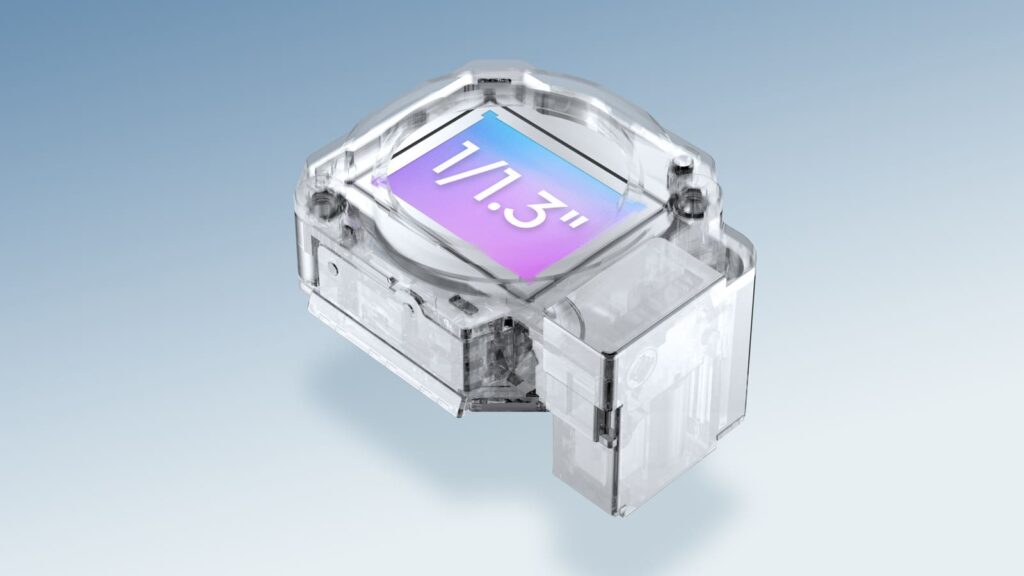
DJI Flip CMOS Sensor – souce: mynewsdesk
Camera Quality: Where the Real Price Gap Lives
This is the single biggest reason the Flip costs nearly twice as much — and it shows up in every real-world shooting situation.
Sensor Size and What It Actually Means
The Flip’s 1/1.3-inch sensor has roughly 2.5× the surface area of the Neo 2’s 1/2-inch sensor. More surface area means more light per pixel, which translates directly into better dynamic range, cleaner shadows, and usable footage in conditions like the golden-hour mist above Lake Constance or the deep shade inside Ulm’s Fishermen’s Quarter. In flat midday light both drones look broadly similar. In anything challenging — dusk, overcast, backlit architecture — the gap opens wide.
10-bit D-Log M vs 8-bit Normal
The Flip’s 10-bit D-Log M colour profile records a flat, log-encoded image that preserves detail in highlights and shadows simultaneously, giving you full control in post. A sunset over the Hohenzollern Castle shot in D-Log M will retain the pink sky and the dark silhouette of the battlements without forcing you to choose. The Neo 2 shoots in 8-bit Normal only — what you see on screen is roughly what you get, which is absolutely fine for social content, but limits your grading latitude significantly.
⚠️ Warning: Shooting D-Log M without ND filters will destroy your footage. Log profiles require controlled exposure. For the Flip, always pair it with a proper ND set for any outdoor shooting.
For D-Log M work on the Flip, I recommend the Freewell ND Filter Set for DJI Flip — the magnetic system is fast enough to swap between ND64 and ND16 mid-shoot when clouds roll in over the Dolomites. Best For: Serious hobbyists and timelapse creators shooting in D-Log M.
The 3-Axis vs 2-Axis Gimbal Difference
The Flip’s 3-axis mechanical gimbal stabilises on roll, pitch, and yaw — the result is silky footage even in gusty Alpine conditions at 1,500m. The Neo 2’s 2-axis gimbal (added with the Gen 2 upgrade over the original Neo’s electronic-only stabilisation) is a meaningful step up from its predecessor, but it still shows subtle roll wobble in wind above ~25 km/h. For calm days and controlled environments it’s perfectly smooth. For exposed mountain ridgelines, the Flip is the more reliable tool.
Flight Time and Battery: 31 Minutes vs ~19 Minutes
Twelve minutes sounds modest until you’re on a castle rampart in the Swabian Alps with one shot at the right cloud formation and your battery indicator drops to 20%.
The Flip’s 31-minute rated flight time is genuinely useful in real-world conditions — in calm to moderate wind (under 30 km/h) you’ll routinely see 26–28 usable minutes. That’s enough for two or three proper timelapse hover sequences, a hyperlapse run, and landing with reserve. For timelapse creators specifically, longer hover time directly translates to more frames — check the Drone Hyperlapse Calculator to plan your shot before you fly.
The Neo 2’s ~19-minute rating drops to around 15–16 usable minutes in typical outdoor conditions. That’s enough for social content — a handful of Quickshot sequences, a tracking shot, landing — but if you’re working on a timelapse that needs 10 minutes of hover at a fixed point, you’re looking at tight margins or a mid-sequence battery swap. If you’re using the Neo 2 for timelapse work, buy the Fly More Combo and have two batteries charged.
💡 Pro Tip: Cold weather kills battery life hard. Shooting a fog timelapse above the Aach valley in January? Expect both drones to lose 15–20% of rated capacity at 5°C. Always start with a warm battery, and if you’re using the Flip for timelapse, set your Timelapse Interval Calculator to account for a 20% safety margin on flight time.
| Scenario | DJI Flip | DJI Neo 2 |
|---|---|---|
| Rated flight time | 31 min | ~19 min |
| Typical usable time (outdoor) | 26–28 min | 15–16 min |
| Cold weather (~5°C) estimate | ~24 min | ~13 min |
| Long timelapse hover viability | ✅ Yes | ⚠️ Tight — 2 batteries recommended |
| Quick social content run | ✅ Overkill | ✅ Ideal |
The Timelapse Creator's Perspective: Why the Flip Wins Here Specifically
If timelapse or hyperlapse is part of your workflow, the choice between these two drones is not actually close — and it’s worth explaining why in detail, because most comparison articles treat timelapse as an afterthought.
Sensor + Log = Grading Latitude You'll Actually Us
A timelapse shot compresses time, which means every frame matters more, not less. The Flip’s 10-bit D-Log M captures a sky transition — from bright afternoon to deep orange dusk above the Aach fog valley — with the full dynamic range intact across every single frame. The Neo 2’s 8-bit Normal clips highlights in a way that’s invisible in a single video clip but becomes a visible flicker artefact across a 600-frame timelapse sequence as the sky shifts. If you’re doing serious holy grail timelapse work — shooting through a full day-to-night transition — the Flip is the only option at this price point. The complete workflow for that technique is covered in the Holy Grail Timelapse: Complete Day-to-Night Settings & Workflow guide (discovered on-site).
Flight Time as a Creative Constraint
A standard drone timelapse at 2-second intervals over 20 minutes produces 600 frames — enough for a 25-second clip at 24fps. The Flip gives you that full sequence with 6–8 minutes of reserve. The Neo 2’s 15–16 usable minutes means you’re either cutting your sequence short or landing for a battery swap mid-shoot, which introduces a position shift that’s nearly impossible to hide in post. For short social-format timelapses (under 8 minutes hover) the Neo 2 is workable with the Fly More Combo. For anything cinematic — construction documentation, sunrise-to-morning city sequences, Swabian Alb fog transitions — the Flip’s 31-minute battery is a genuine creative advantage, not a marginal one.
💡 Pro Tip: For hyperlapse specifically, the Flip’s 3-axis gimbal makes a visible difference on long manual hyperlapse runs where accumulated roll error compounds over dozens of steps. Use the free Hyperlapse Step Calculator to plan your step count and interval before you fly — it removes all the maths from the field and lets you focus entirely on the move.
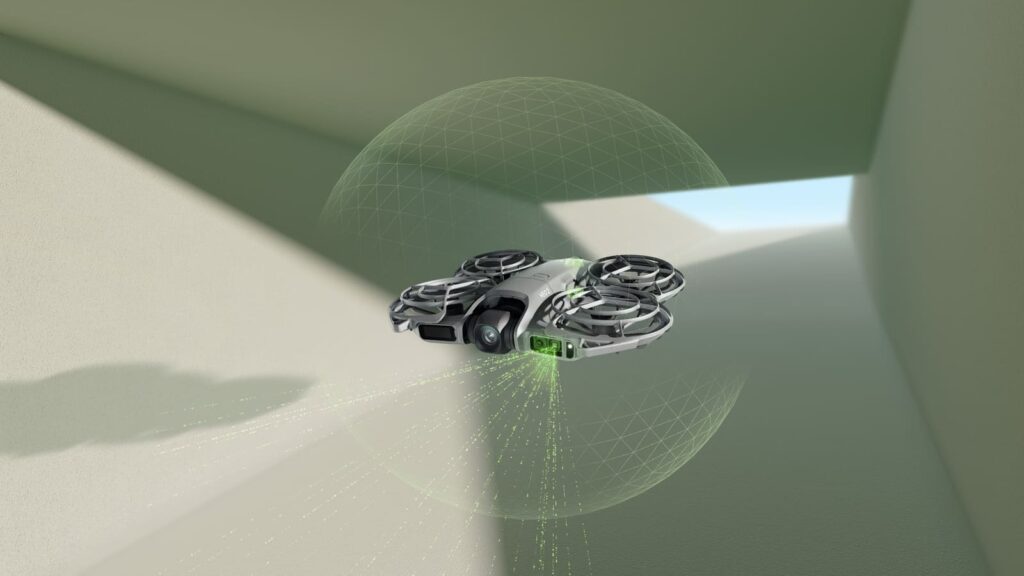
DJI Neo 2 – souce: mynewsdesk
Obstacle Avoidance and Safety: The Neo 2's Biggest Advantage
This is where the Neo 2 does something the Flip genuinely cannot — and it’s a big deal for new pilots.
Neo 2's Omnidirectional System
The Neo 2 combines an omnidirectional monocular vision system with a downward infrared sensor and a forward-facing LiDAR to build a 360° picture of its environment. In practical terms: if a tree branch enters its flight path from the side, the Neo 2 will stop or reroute. This is not a gimmick — in forest environments, around construction scaffolding in central Ulm, or on narrow city streets with balconies jutting out, omnidirectional avoidance genuinely prevents crashes that would destroy the drone.
The Flip's Forward-Only Sensing
The Flip has forward-facing obstacle detection only. Flying forward with an active flight path in familiar, open airspace, it will detect objects ahead. Bank hard to the left, reverse into a tree branch, or fly in SPORT mode, and you’re on your own. This is standard for drones in this price range and weight class, but it’s important to understand before you fly in tight or unfamiliar environments.
For beginners in particular: the Neo 2’s avoidance system is legitimately confidence-building. It lets you focus on framing rather than flight — which is exactly where your attention should be when you’re learning. See our Best Drones for Beginners 2026 guide for more on how obstacle avoidance affects the learning curve.
⚠️ Warning: Obstacle avoidance does not work in low-light conditions, fog, or when flying very close to reflective surfaces like water. Never rely on it exclusively — always maintain visual line of sight and fly with intention, regardless of which drone you’re using.
Portability and Travel Reality
The weight difference between 151g and 249g sounds small. On a 10-day Alpine trip, it is not small.
The Neo 2 at 151g is lighter than most smartphones. It fits in a jacket pocket. It passes through airport security without a second glance. If you’re an ultralight hiker or a backpacker prioritising every gram, the Neo 2 is effectively weightless compared to any other 4K drone option. Its rigid, non-folding body means it’s also more robust to casual bag-throwing than a folding drone — there are no hinges to stress.
The Flip’s folding design means it collapses to roughly smartphone size, but at 249g it’s a more deliberate packing decision. It will still fit in a jacket pocket if it’s a roomy one, and it packs cleanly into the top of any daypack. In a dedicated drone belt pouch it’s invisible. The tradeoff — 98g extra and a slight bulk increase — buys you the significantly stronger imaging platform.
For travel-specific guidance on EU drone regulations, flying near protected areas in Southern Germany and Austria, and recommended travel cases for both drones, see the Best Travel Drones 2026 guide.
Who Should Buy Which Drone: The Decision Framework
The DJI Flip is for you if output quality drives every other decision. If your footage ends up on YouTube, Vimeo, or stock platforms — or if you’re shooting timelapse, hyperlapse, real estate aerials, or anything you’ll colour grade — the 10-bit D-Log M sensor, 31-minute battery, and 3-axis gimbal make the Flip the only serious choice at this weight class and price point. You should already understand basic drone flight, or be willing to invest a few sessions learning it, because the Flip rewards intentional flying rather than babysitting you through it.
The DJI Neo 2 is for you if the drone needs to disappear into your life. If this is your first drone, if you want something in your jacket pocket on every trip without a second thought, or if your content lives primarily on Instagram, TikTok, or YouTube Shorts where 8-bit 4K is genuinely sufficient — the Neo 2 at €229 is the smarter buy. The controller-free operation (palm launch, gestures, Apple Watch), omnidirectional obstacle avoidance, and 151g weight mean you’ll actually fly it, which matters more than any spec comparison ever will.
If neither feels quite right, consider the DJI Mini 4 Pro. It sits above both at around €750+, delivers a class-leading camera in the same C0 sub-249g category, and is worth considering if you want to skip the upgrade cycle entirely. The Best Drones Under 500 Euro 2026 guide shows exactly where these three sit relative to each other and to the wider budget landscape.
For the full decision framework across all beginner and intermediate options, the Best Drones — The Complete Buyer’s Guide covers every tier from €200 to €2,500, including EU-specific regulatory notes for each category.
Complete Travel Kit: Everything You Need to Fly
You’ve made your choice. Now here is every piece of kit that belongs in your bag — not the minimum to get airborne, but the complete setup that means you arrive at the Dolomites, the Hohenzollern, or wherever you’re headed and have nothing left to buy or wish you’d packed.
The Drone
DJI Flip
For the creator who wants footage that earns its place in post, I recommend the DJI Flip — the 1/1.3-inch sensor, 10-bit D-Log M, 3-axis gimbal, and 31-minute battery make it the most capable camera drone available under 249g at this price point. Best For: Hobbyists, timelapse creators, and travel videographers who shoot for YouTube, stock, or colour-graded output.
DJI Neo 2
For the first-time pilot or the creator who wants a drone in every jacket pocket, every trip, I recommend the DJI Neo 2 — omnidirectional obstacle avoidance, 151g, palm launch, and no-controller operation make it the most genuinely accessible 4K drone DJI has ever made. Best For: Beginners, solo travellers, vloggers, and anyone whose priority is flying often rather than grading deeply.
Spare Batteries / Fly More Combo
One battery is never enough — not for a timelapse, not for a multi-location travel shoot, not even for a single afternoon in good light. The Fly More Combo for both drones bundles two or three batteries with a charging hub, which lets you rotate batteries in the field from a power bank without needing a wall socket. On the Flip, a second battery extends your session from ~28 minutes to ~55 usable minutes — the difference between one timelapse sequence and three. Buy the Fly More Combo at the point of purchase; it’s always cheaper than batteries bought separately later.
DJI Fly More Combo for DJI Flip — essential for timelapse and multi-location travel shoots; one battery is insufficient for serious use.
DJI Fly More Combo for DJI Neo 2 — especially important given the shorter 19-minute base battery life; two batteries are the practical minimum for a day out.
ND Filters
Every outdoor video shoot on either drone needs ND filters — they lock your shutter speed to the 180° rule (1/50s at 25fps, 1/60s at 30fps) for natural motion blur, and protect the Flip’s D-Log M from blowing out in daylight. The key spec is the magnetic mount: you’ll be swapping filters on a hillside in the wind, not on a desk.
For the Flip, I recommend the Freewell ND Filter Set for DJI Flip — covers ND4 through ND64 for full outdoor range, magnetic snap-on in under 3 seconds. Best For: Flip owners shooting D-Log M video or timelapse in any outdoor conditions.
For the Neo 2, I recommend the Freewell Magnetic Filter Set for DJI Neo 2 — same magnetic system, cut specifically for the Neo 2 lens. Best For: Neo 2 owners shooting video in anything brighter than overcast. Use the free ND Filter Calculator to get the exact filter stop for your frame rate and ambient light before you fly.
Memory Card
Both drones shoot 4K video and require a V30-rated microSD card as a minimum — anything slower and you risk dropped frames or corrupt footage mid-sequence. For both drones, I recommend the SanDisk Extreme Pro V30 256GB — it comfortably handles 4K/60fps on the Flip and gives you enough headroom for a full day of timelapse frames plus regular footage without swapping cards in the field. Best For: Any creator shooting 4K, especially in timelapse or hyperlapse mode. Use the Drone Hyperlapse Calculator to estimate how many GB your planned sequence will consume before you shoot.
Carrying Case
Neither the Flip nor the Neo 2 ships with a hard case adequate for travel — the included pouches offer scratch protection, not impact protection. A semi-rigid shoulder case or a drone-specific insert for a backpack is the difference between your drone arriving intact and arriving with a cracked arm or a scratched lens.
Portable Charger / Power Bank
A power bank that supports USB-C PD charging lets you top up batteries from a car seat, a café, or a mountain refuge. Both the Flip and Neo 2 charging hubs accept USB-C — a 20,000mAh PD bank will fully charge two Flip batteries or three Neo 2 batteries in the field without a wall socket.
Read Next on Aero Timelapse
- Best Drones — The Complete Buyer’s Guide (2026) — The parent guide covering every drone category, EU regulations, and buying framework in full
- Best Travel Drones 2026 — How the Flip and Neo 2 fit into the wider travel drone landscape, including C1/C2 alternatives
- Best Drones for Beginners 2026 — If you’re buying your first drone, this guide explains the learning curve and what to prioritise
- Drone Buying Checklist (2026) — The pre-purchase checklist every buyer should run through before spending a cent
- 🔧 ND Filter Calculator — Get the exact ND you need for your shutter speed and lighting conditions before your next shoot
Frequently Asked Questions
Is the DJI Neo 2 a significant upgrade over the original DJI Neo?
Yes — it’s a meaningful generational step. The Neo 2 added a 2-axis mechanical gimbal (the original used electronic stabilisation only), upgraded obstacle avoidance to a full omnidirectional system with forward LiDAR, improved motor noise (the original’s high-pitched whine was a genuine problem), and made the body foldable rather than rigid. If you own the original Neo, the Neo 2 is worth upgrading to. If you’re buying new, there’s no reason to consider the first-generation model.
Can the DJI Flip shoot timelapse, and how does it compare to the Neo 2 for that use case?
Yes, the Flip has a capable timelapse and hyperlapse mode built into the DJI Fly app. Its 31-minute battery life and 10-bit D-Log M colour profile make it noticeably better for timelapse work than the Neo 2 — longer hover time means more frames, and log footage gives you grading latitude for the dramatic sky transitions a good timelapse demands. For planning your shot, use the free Timelapse Interval Calculator and the Drone Hyperlapse Calculator to dial in your settings before you fly.
Do I need to register either drone in Germany or the EU?
No. Both the DJI Flip (249g) and the DJI Neo 2 (151g) fall under EASA’s C0 category, which means no drone registration, no EASA operator number, and no A1/A3 Open Category training is required to fly them recreationally in Germany under LBA and EASA Open Category rules. Standard rules still apply: no flying over uninvolved people, no flying within 50m in A1 restricted zones, and always within visual line of sight. Always check local airspace restrictions using DJI Fly’s airspace layer or the DFS Aviation app before flying in Germany.
Can the DJI Neo 2 be flown without a phone or controller?
Yes — and this is one of its defining features. The Neo 2 can take off directly from your palm, execute Quickshot automated flight modes via gesture commands alone, and land back on your hand. You don’t need a phone, a controller, or even a bag. Adding an RC-N3 controller dramatically extends its range and gives you manual control, but for solo content creation it genuinely works as a completely untethered device. The DJI Flip, by contrast, needs either the RC-N3 or the DJI Fly app on a phone for most of its feature set.
Which drone is better for stock footage sales?
The DJI Flip, clearly. Stock platforms like Adobe Stock, Shutterstock, and Pond5 increasingly favour 4K footage with wide colour grading latitude — the Flip’s 10-bit D-Log M files are significantly more competitive than the Neo 2’s 8-bit Normal output. That said, stock footage from a 1/2-inch sensor can sell if the subject matter is strong and the light is good. If stock is your goal, use the Stock Footage Metadata Generator to optimise your file submissions regardless of which drone you’re shooting with.
Conclusion: Make the Call and Get Flying
Plenty of people buy the wrong drone by overthinking the spec sheet instead of being honest about how they actually create. The DJI Flip is the right tool if you’re going to sit with footage in DaVinci at 11pm and care whether the Hohenzollern skyline grades the way you imagined it. The DJI Neo 2 is the right tool if the drone needs to earn its place in a jacket pocket on every trip, not just the ones where you planned to film. Both of those creators are serious — they just work differently.
Run through the Drone Buying Checklist before you order, confirm your kit is complete, and then go find something worth shooting. The drone that stays in the bag wasn’t worth buying.
Dipon is a drone and timelapse cinematographer based in Ulm, Germany, with over 15 years of experience turning real spaces and projects into cinematic visuals. With a background in digital marketing, every shot is planned with a clear purpose — where it will appear, who will see it, and what it should help them decide.
You May Also Like
How to Shoot a Little Planet Photo With a Drone
Best Drones for Beginners (2026): Safe, Easy Picks + Buying Guide
Why Sensor Size Matters When You’re Buying a Drone
How Weather Affects Timelapse & Drone Shoots
DJI Lito X1 vs Mini 5 Pro: Which Ultralight Drone Belongs in Your Camera Bag?
DJI Mavic 4 Pro vs DJI Air 3S
DJI Air 3S Review: The Sweet-Spot Drone for Creators and Professionals
DJI Mavic 4 Pro Review: Is It Worth It for Professional Work? (2026)

Best Prime Week Drone Deals for Creators and Beginners
Drone Laws & Regulations — The Complete Legal Guide for EU Pilots (2026)

Best Timelapse Cameras Under €1,000 in 2026

DJI Lito X1 Review: The Ultimate Pocket-Sized B-Cam for Creators?
Need help capturing aerials for your next project but not ready to invest in the gear yet? Check out our Drone Videography to see how Aero Timelapse Studio can help elevate your production.