
What Timelapse Sells: Best Timelapse Subjects for Stock Footage
Dipon | February 2026
Table of Contents
- Intro
- Quick Answer: What Timelapse Sells
- Quick List of Winners :12 categories beginners can shoot
- The “Stock Buyer Brain”: Why Some Timelapses Sell
- Subject Decision Matrix – Best Timelapse Subjects for Stock Videos
- 30 Timelapse Subjects
- Make It Commercial-Safe
- Technical Quality Checklist
- FAQ
- Next Steps -Turn inspiration into uploads
Affiliate Disclosure
This guide contains affiliate links. Purchases made through these links support Aero Timelapse Studio at no additional cost to you. I only recommend products I personally use or carefully research. As an Amazon Associate I earn from qualifying purchases.
Most creators shoot beautiful timelapses that never sell because buyers are not shopping for “pretty” – they are shopping for “useful”. Stock clients want timelapse stock footage that illustrates business, cities, logistics, climate, and everyday life they can plug into real projects under deadline pressure.
I learned this the hard way. My early portfolio was full of dramatic sunsets and moody fog sequences. They looked great. They barely sold. The clips that actually started generating consistent income were a rush-hour intersection in Dhaka and a construction crane on a new residential block – neither of which I thought were remarkable when I shot them. This guide is built around what I’ve learned about what buyers actually need.
Quick Answer: What Timelapse Sells
The best timelapse subjects for stock videos are scenes that illustrate big themes buyers constantly need: business, travel, weather, infrastructure, and everyday life. Focus on subjects that are easy to understand at a glance and can be reused in many projects.
Construction progress on buildings and infrastructure – for real estate, architecture, and industry explainers
City traffic, intersections, and commuter flows – for business, transport, and urban lifestyle stories
Clouds, weather fronts, and fog – for background plates, documentaries, and climate content
Sunrise, sunset, and golden hour skylines – evergreen mood setters and establishing shots
Night cityscapes and day-to-night transitions – for technology, finance, and nightlife themes
Trains, trams, airports, and logistics hubs – for travel, mobility, and supply chain content
Seasonal nature scenes (spring blossoms, autumn leaves, snow) – tourism and environment videos
Renewable energy and industry (wind turbines, solar fields, factories) – sustainability, economy, and tech
Public squares, markets, pedestrian zones – lifestyle, tourism, and culture
Office towers, business districts, and coworking spaces – corporate and fintech explainers
Riverfronts, harbors, and bridges – transport and city identity shots
Timelapse of screens, dashboards, and data centers – abstract tech and “digital transformation” concepts
Quick List of Winners :12 categories beginners can shoot
This section is a shortcut to what stock footage sells often across major timelapse stock footage platforms like Pond5, Adobe Stock, and Shutterstock. Each category includes who might buy it, why it sells, and a first shot idea you can shoot this week in almost any EU city.
Table: 12 beginner-friendly timelapse categories
| Category | Best use case (who buys it) | Why it sells (utility) | Difficulty | Release risk | First shot to try |
|---|---|---|---|---|---|
| Busy intersection traffic | TV, YouTube news, business explainers | Shows urban growth, mobility, rush hour | Easy | Low (shoot wide, no faces) | Evening rush hour crossroad from pedestrian bridge |
| Clouds over city skyline | Documentaries, corporate, background loops | Perfect neutral background and establishing shot | Easy | Low | Lock-off tripod view of skyline with fast-moving clouds |
| Train station platforms | Travel brands, transport explainers | Visualizes commuting, travel, logistics | Medium | Medium (faces, logos) | Wide shot of platforms from overhead with small people |
| Construction crane on new building | Real estate, architecture, finance | Symbolizes growth, investment, change | Medium | Medium | Daytime crane and workers on high-rise skeleton |
| Pedestrian shopping street | Tourism boards, lifestyle brands | Shows local culture and economy | Medium | Medium | Hyperlapse down pedestrian zone with gimbal |
| Wind turbines in fields | Sustainability, energy, policy videos | Strong symbol for renewable energy | Easy | Low | Sunset tripod timelapse of turbines spinning |
| Highway light trails | Car brands, tech, mobility | Dynamic, abstract motion for intros | Easy | Low | Night timelapse from bridge over Autobahn |
| River or canal with boats | Tourism, city branding | Calm, scenic movement and reflections | Easy | Low | Boats passing on river through city center |
| Office tower lights turning on | Corporate, fintech, real estate | Symbolizes business activity and productivity | Medium | Low | Blue hour timelapse of office block lighting up |
| Seasonal park (autumn or spring) | Travel, wellness, environmental | Clear visual of changing seasons | Easy | Low | Park trees changing color with moving clouds |
| Market or Christmas fair | Tourism, culture content | Shows local traditions and food | Medium | High (faces, trademarks) | Elevated tripod shot over market stalls at dusk |
| Airport runway / planes taxiing | Airlines, logistics, business travel | Strong symbol for global connectivity | Medium | High (editorial/logos) | Distant view of runway with planes landing and taking off |
Many of these can be shot from public spaces with just a sturdy tripod and an intervalometer to control your capture interval. A basic tripod upgrade and simple intervalometer already unlock most of these.
Start where demand already exists
The “Stock Buyer Brain”: Why Some Timelapses Sell
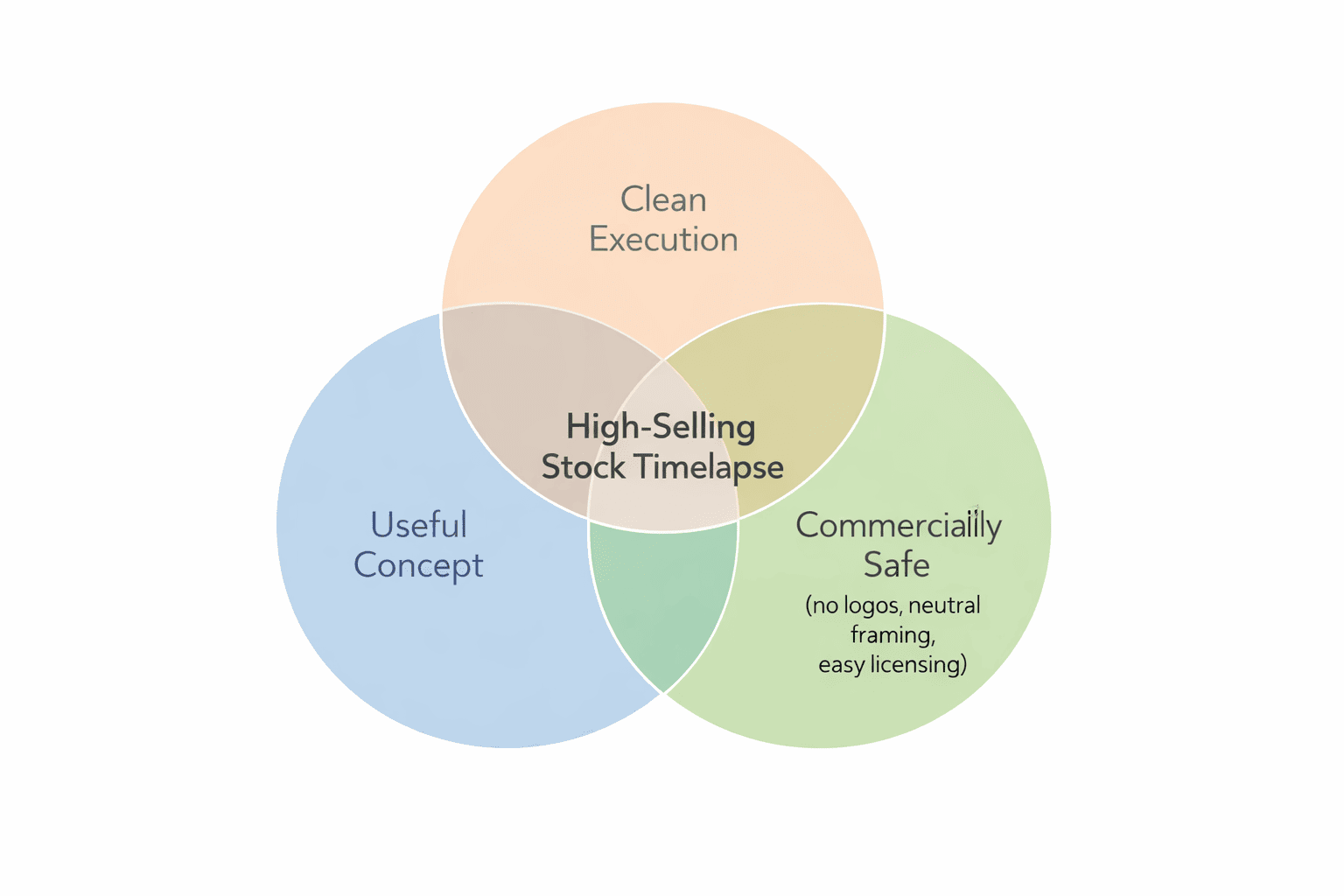
Stock buyers license timelapse stock footage to solve a problem in their edit: they need a clip to illustrate an idea under deadline and budget pressure. Understanding this “buyer brain” will guide your choice of timelapse footage that sells more reliably.
Utility beats aesthetics
Buyers care more about what a clip communicates than how hard it was to shoot. A simple 10-second 4K timelapse of clouds rolling over a city can outsell a complex hyperlapse through a cathedral if the clouds shot matches more real-world storylines.
Think of each scene as an “answer” to a visual question: “What does urban growth look like?”, “How do we show climate change?”, “What is Monday morning commute?”.
What Makes a Clip Sell
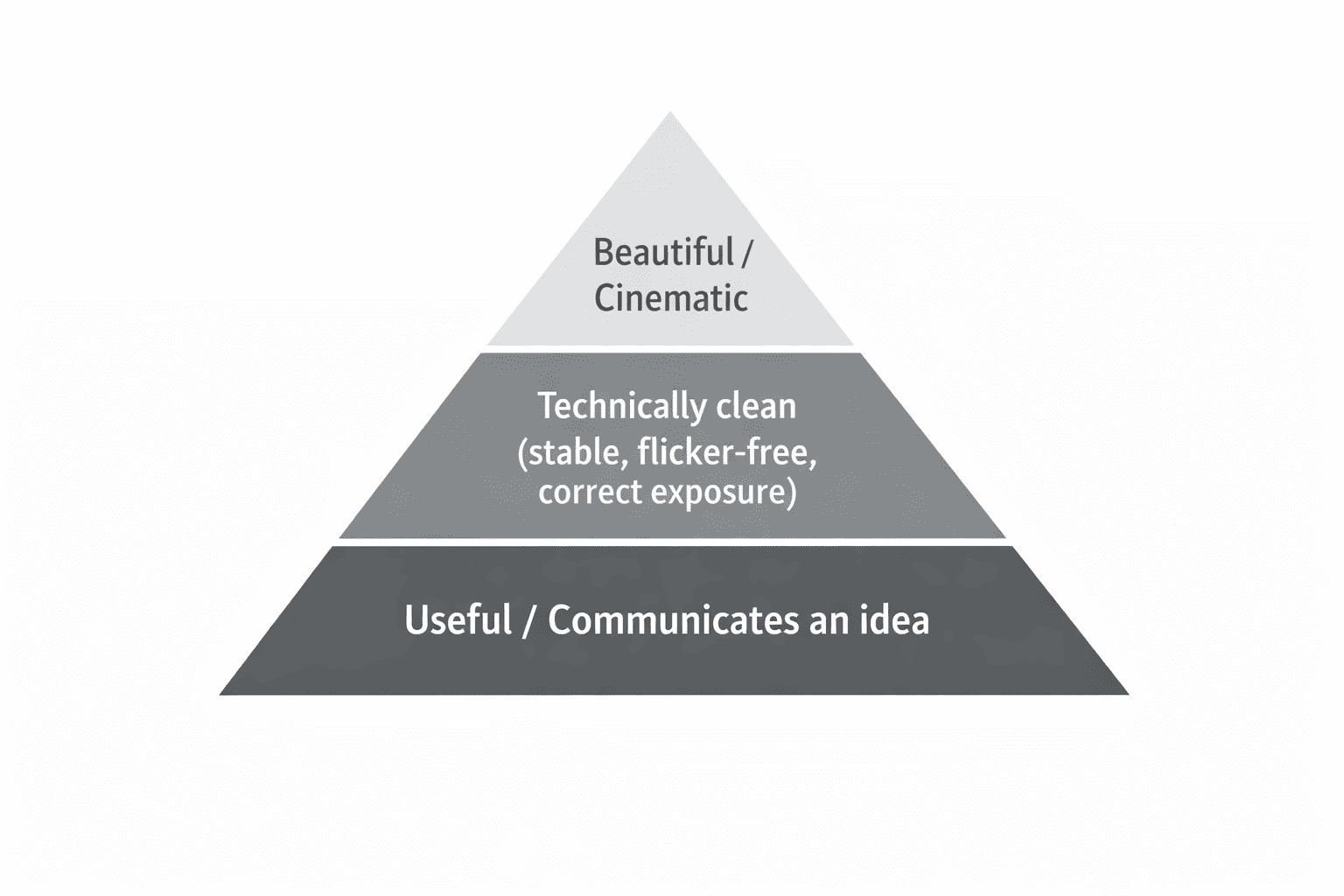
What Actually Makes a Timelapse Sell: The Buyer Preference Pyramid
Stock buyers rarely purchase a timelapse just because it looks beautiful. What matters most is whether the clip clearly communicates an idea that helps tell a story or support a message. Footage that shows growth, movement, atmosphere, or the passage of time in a way that is immediately understandable has the highest value to buyers.
Technical quality comes next. A clip must be stable, flicker-free, and properly exposed so it can be used without extra work in post-production. Even a strong concept may be rejected if the execution makes editing difficult.
Aesthetic beauty sits at the base of the pyramid. Cinematic light, dramatic skies, or striking colors can improve a clip, but they rarely compensate for a weak or unclear concept. In stock footage, usefulness drives sales first—visual appeal is what makes a good clip even better.
The Buyers Preference Pyramid
Evergreen beats trendy
Evergreen subjects are clips that will still be useful in five years: seasons, city skylines, logistics, office life, renewable energy, and transport. Trends (like a specific meme location) may spike briefly but then die, while evergreen categories build consistent timelapse stock footage earnings over time.
Focus your shooting calendar around recurring patterns in your region (rush hour, weekly markets, seasonal changes) rather than chasing one-off viral spots.
Specific beats generic
“City timelapse” is too generic; “day-to-night timelapse of busy European city intersection with tram and car traffic” is much more useful. Buyers search using specific timelapse stock video keywords describing location type, motion, time of day, and theme.
Aim for clearly readable scenes with one main idea, while avoiding identifiable faces, private property interiors, and dominant logos so your clips stay commercially safe.
Subject Decision Matrix – Best Timelapse Subjects for Stock Footage
This decision matrix helps you quickly sort which ideas are worth your limited shooting time. It balances buyer demand, competition, effort, and legal/release risk.
| Subject | Buyer demand | Competition | Shoot time | Editing time | Release risk | Best capture method | Notes |
|---|---|---|---|---|---|---|---|
| City rush hour intersection | High | High | 1–2 h | Low | Low–Med | Tripod | Classic urban mobility shot, great for hyperlapse too |
| Highway light trails | High | Medium | 1–2 h (night) | Low | Low | Tripod | Easy loopable clip, avoid license plates close-up |
| Office tower lights on at dusk | High | Medium | 1–2 h | Medium | Low | Tripod/slider | Perfect corporate opener, shoot in blue hour |
| Wind turbines in fields | High | Medium | 1–2 h | Low | Low | Tripod/drone | Strong sustainability symbol, watch drone rules |
| Solar panel fields | Medium–High | Medium | 1–2 h | Low | Med | Drone | Commercial property, often editorial only |
| Clouds over mountains | High | High | 1–3 h | Low | Low | Tripod | Evergreen background plate, make it loopable |
| Fog rolling through valley | Medium–High | Medium | 2–4 h | Medium | Low | Tripod/drone | Seasonal but highly cinematic, plan carefully |
| River or canal through city | High | Medium | 1–2 h | Low | Low | Tripod | Tourism and city branding staple |
| Construction site with crane | High | High | 1–3 h (short-term) | Medium | Med | Tripod | Great for real estate; logos and workers faces are issues |
| Bridge traffic at night | High | Medium | 1–2 h | Low | Low | Tripod | Combines city identity with motion; easy seller |
| Train station overview | High | High | 1–2 h | Medium | Med–High | Tripod | Many faces/logos: often editorial-only |
| Airport apron / runway | High | High | 1–2 h | Medium | High | Tripod/drone (where legal) | Strong travel symbol; likely editorial-only |
| Christmas market crowd | Medium–High | Medium | 1–2 h | Medium | High | Tripod/hyperlapse | Great seasonal sales, but lots of model/logo issues |
| Windy wheat field with clouds | Medium–High | Low–Med | 1–2 h | Low | Low | Tripod/drone | Underserved rural content, easy to shoot |
| Data center / server LEDs | Medium | Low | 1–2 h | Medium | Med–High | Tripod | Great tech metaphor; property restrictions apply |
| Container port cranes | High | Medium | 1–2 h | Medium | Med | Tripod/drone | Logistics, trade, and economy stories |
| Tram passing historic buildings | High | Medium | 1–2 h | Medium | Med | Tripod/hyperlapse | Strong “European city” feel, great for EU markets |
| Bicycle commuters lane | Medium–High | Low–Med | 1–2 h | Low | Low–Med | Tripod | Perfect for sustainability/health narratives |
| Renewable energy substation | Medium | Low | 1–2 h | Medium | Med | Tripod | Niche B2B use, but high-paying clients |
| Market or flea market | Medium | Medium | 1–2 h | Medium | High | Tripod | Strong lifestyle feel, but heavy release considerations |
30 Timelapse Subjects
This section gives you 30 of the best timelapse ideas grouped into six clusters. For each, you get a “recipe”: what buyers use it for, where to shoot in Germany/EU, how to capture it (tripod, drone, or hyperlapse), an interval starting point, and keyword angles.
For intervals, adjust based on motion speed and final frame rate; use Timelapse Interval Guide for deeper theory.
A. Urban & Business
1. Rush hour crossroads in a mid-sized city
Use: Business, mobility, urban growth stories.
Where: Any German or EU city with a visible intersection and tram/bus lanes (e.g., city center ring roads, business districts).
Capture: Tripod, 4K, 24 or 30 fps export; interval 1–3 seconds. You need a solid tripod and an intervalometer like the Pixel TW-283 – the built-in interval timer on most cameras isn’t reliable enough for long sequences.
Keywords: “busy city intersection timelapse”, “European city traffic stock footage”, “urban rush hour commuters”.
2. Day-to-night skyline from a rooftop
Use: Corporate, fintech, tech and startup explainers.
Where: Legal public viewpoints or paid rooftop terraces overlooking skylines in larger EU cities.
Capture: Tripod, ND filters for smooth motion; interval 4–8 seconds; expose for mid-tones.
Keywords: “day to night city skyline timelapse”, “financial district lights turning on”, “Europe skyline 4K timelapse”.
3. Pedestrian-only shopping street
Use: Tourism, retail, lifestyle, city branding.
Where: Central Fußgängerzone in German towns or historic centers in other EU cities.
Capture: Tripod or gentle hyperlapse on gimbal; interval 1–2 seconds.
Keywords: “European pedestrian street timelapse”, “shopping street crowd”, “city tourism Germany stock video”.
4. Office windows with people working inside (non-identifiable)
Use: HR, productivity, remote work, economy themes.
Where: Business parks, glass office buildings, coworking centers (from public space).
Capture: Tripod/slider; interval 2–4 seconds; avoid tight shots of faces.
Keywords: “office building timelapse”, “business people silhouettes”, “modern office windows night timelapse”.
5. Bicycle commuters lane
Use: Sustainability, health, mobility, climate-friendly cities.
Where: Popular bike lanes in German cities, especially with morning or evening flow.
Capture: Tripod; interval 1–2 seconds; slight telephoto compresses movement.
Keywords: “bicycle commuters timelapse”, “sustainable transport stock footage”, “European bike lane traffic”.
B. Construction & Infrastructure
6. Tower crane on new residential block
Use: Real estate, construction, investment, city development.
Where: New housing projects on city edges or infill developments visible from public sidewalks.
Capture: Tripod; interval 3–8 seconds; 1–2 hours, or return multiple days for variations.
Keywords: “construction crane timelapse 4K”, “new apartment building construction”, “urban development Germany”.
7. Roadworks on major street or roundabout
Use: Infrastructure, public spending, transport updates.
Where: Any road construction viewable from safe public areas.
Capture: Tripod; interval 3–5 seconds; show machinery and traffic patterns.
Keywords: “road construction timelapse”, “infrastructure works stock footage”, “highway roadworks Europe”.
8. Bridge with car and tram traffic
Use: Transport, city identity, mobility projects.
Where: Bridges over rivers or rail lines; classic in many EU cities.
Capture: Tripod; interval 1–2 seconds; shoot blue hour for light trails.
Keywords: “bridge traffic night timelapse”, “tram and car lights”, “urban infrastructure 4K”.
9. Railway junction with switching tracks
Use: Logistics, rail transport, supply chain, energy savings.
Where: Overpasses near rail yards or major stations (from public spots).
Capture: Tripod; interval 1–3 seconds; avoid close-ups of logos.
Keywords: “railway junction timelapse”, “train traffic stock video”, “logistics infrastructure Europe”.
10. Wind farm access road with vehicles
Use: Renewable energy plus infrastructure development.
Where: Wind parks on hills or plains, shot from public pathways.
Capture: Tripod or drone; interval 2–4 seconds. In Germany, always verify your airspace classification and no-fly zones before launching — most wind farms sit outside urban zones but still require a check.
Keywords: “wind farm timelapse”, “renewable energy road”, “green energy Germany stock footage”.
C. Nature & Weather
11. Fast-moving cumulus clouds over city
Use: Background, climate, weather, intros.
Where: Any skyline or church tower with big sky behind.
Capture: Tripod, ND if bright; interval 2–5 seconds; make the clip loopable by aligning first and last frames.
Keywords: “city clouds timelapse 4K”, “loopable sky background”, “weather time lapse Europe”.
12. Fog rolling through valley or over city
Use: Mood, mystery, climate change, documentaries.
Where: Hills above rivers, mountains, or cities that get inversion fog (common in parts of Germany and Central Europe).
Capture: Tripod or drone; interval 2–6 seconds; shoot at dawn.
Keywords: “fog rolling over city timelapse”, “misty valley sunrise”, “dramatic weather stock footage”.
13. Seasonal forest canopy (spring to autumn)
Use: Climate, tourism, wellness, environmental education.
Where: Nearby forests, national parks, or city parks with deciduous trees.
Capture: Tripod; interval 3–10 seconds; emphasize moving clouds or wind for motion.
Keywords: “autumn forest timelapse”, “fall foliage 4K”, “season change nature Europe”.
14. River current and sky reflections
Use: Backgrounds, meditative content, tourism, wellness.
Where: Wide river sections or canals through towns.
Capture: Tripod; interval 1–3 seconds; polarizer optional; aim for loopable clips.
Keywords: “calm river timelapse”, “water reflections loopable”, “relaxing nature stock video”.
15. Storm clouds approaching solar farm or village
Use: Climate risk, energy, news, environment.
Where: Open countryside with view of panels or village rooftops.
Capture: Tripod/drone; interval 1–3 seconds; watch rain and lightning safety.
Keywords: “storm clouds timelapse”, “approaching thunderstorm 4K”, “climate change concept stock footage”.
D. Travel & Logistics
16. Trains arriving and leaving main station
Use: Travel agencies, transport explainers, news, economy.
Where: Platforms or overhead walkways at Hauptbahnhof or similar EU main stations.
Capture: Tripod; interval 1–3 seconds; keep faces small; probably editorial-only due to logos.
Keywords: “train station timelapse editorial”, “European railway travel time lapse”, “commuter trains Germany”.
17. Airport runway and taxiway overview
Use: Airlines, business travel, logistics, B2B.
Where: Official airport viewing platforms or legal public vantage points.
Capture: Tripod/drone where allowed; interval 1–3 seconds; mark as editorial if logos/airline brands visible.
Keywords: “airport runway timelapse editorial”, “airplane traffic 4K”, “global travel stock footage”.
18. Container terminal or inland port
Use: Trade, logistics, economy, news.
Where: River ports, container terminals, or harbor areas visible from public land.
Capture: Tripod/drone; interval 2–4 seconds; capture cranes and ship movement.
Keywords: “container port timelapse”, “logistics hub Europe”, “cargo cranes stock footage”.
19. Highway interchange from above
Use: Car brands, insurance, navigation apps, infrastructure stories.
Where: Bridges or hills near large junctions on Autobahn or ring roads.
Capture: Tripod or drone waypoint timelapse; interval 1–3 seconds; ND filters for smooth trails.
Keywords: “highway interchange timelapse”, “traffic junction aerial”, “car light trails 4K”.
20. Ferry or river boat traffic in city
Use: Tourism, commuting, river cruise marketing.
Where: Cities with strong river presence and regular boat lines.
Capture: Tripod; interval 2–4 seconds; shoot golden hour.
Keywords: “river ferry timelapse”, “city boat traffic time lapse”, “European river tourism”.
E. Technology & Industry
21. Wind turbines against sunset sky
Use: Renewable energy, sustainability, policy, climate.
Where: Wind farms visible from country roads.
Capture: Tripod or drone; interval 2–4 seconds. Avoid entering restricted property – most wind farms can be shot from public roads and footpaths without access issues.
Keywords: “wind turbine sunset timelapse”, “renewable energy 4K”, “sustainability concept stock video”.
22. Solar farm with moving shadows
Use: Clean tech, investment, engineering.
Where: Solar parks near highways or villages.
Capture: Tripod/drone; interval 3–6 seconds; limit close-ups of branding.
Keywords: “solar panels timelapse editorial”, “photovoltaic farm 4K”, “clean energy time lapse”.
23. Factory exterior with smoke/steam
Use: Industry, environment, economy, pollution topics.
Where: Public viewpoints near industrial zones or power plants.
Capture: Tripod; interval 2–5 seconds; avoid private property interiors.
Keywords: “factory smokestack timelapse”, “industrial plant stock footage”, “manufacturing Europe”.
24. Data center lights or server racks (if you have access)
Use: Cloud computing, cybersecurity, SaaS marketing.
Where: Only with permission in data centers or server rooms.
Capture: Tripod; interval 1–2 seconds; ensure no confidential data on screens.
Keywords: “server room timelapse”, “data center LEDs time lapse”, “technology infrastructure 4K”.
25. Assembly line robots (permission-based)
Use: Automation, robotics, Industry 4.0.
Where: With permission at factories or labs; this is typically client work that can be sold as stock if contracts allow.
Capture: Tripod/gimbal; interval 1–3 seconds; follow safety protocols.
Keywords: “industrial robot timelapse”, “automated assembly line”, “industry 4.0 stock footage”.
F. Lifestyle & Events
26. Street market or weekly farmers’ market
Use: Food, culture, tourism, local economy.
Where: Weekly markets in town squares across Europe.
Capture: Tripod/hyperlapse; interval 1–2 seconds; release-heavy, often editorial-only due to faces and logos.
Keywords: “farmers market timelapse editorial”, “European street market crowd”, “local food culture stock video”.
27. Christmas market lights at blue hour
Use: Tourism, holiday ads, culture, travel.
Where: Well-known Weihnachtsmärkte and Christmas fairs.
Capture: Tripod; interval 1–2 seconds; watch for kids’ faces and trademarks; editorial-only is often safest.
Keywords: “Christmas market timelapse editorial”, “holiday lights Europe 4K”, “winter tourism Germany”.
28. Café terrace filling and emptying
Use: Hospitality, lifestyle, urban culture.
Where: Popular squares with outdoor cafés.
Capture: Tripod; interval 2–3 seconds; keep framing wide to reduce identifiability.
Keywords: “outdoor cafe timelapse”, “European lifestyle terrace”, “city cafe crowd stock footage”.
29. People commuting up/down escalators
Use: Productivity, commuting, urban life, transport.
Where: Metro stations or malls where photography is allowed.
Capture: Tripod; interval 1–2 seconds; angle from side/back; check property rules.
Keywords: “escalator commuters timelapse”, “subway station time lapse”, “urban commute stock video”.
30. Home office desk setup with screens changing
Use: Remote work, freelancing, productivity, software.
Where: Your own home office (you control property rights).
Capture: Tripod; interval 1–2 seconds; use screen-safe content; loopable clip.
Keywords: “home office timelapse 4K”, “remote work desk setup”, “freelancer workspace stock footage”.
Make It Commercial-Safe
Commercial stock needs clean visuals and proper releases. If your clip is intended for commercial licensing, it must be safe for brands to use in advertising without unexpected legal risk.
In stock, “editorial vs commercial” is a key distinction. Commercial clips can be used in ads and promos, so they must avoid identifiable faces, private property, and logos, or they require signed model and property releases. Editorial clips can show real-world brands, events, and newsy situations but are usually restricted to news and documentary-style uses.
You typically need model releases when people are recognizable and are a main focus, not just tiny background silhouettes. Property releases are needed for private interiors, distinctive buildings, or artworks where the property owner controls usage rights.
To keep footage sellable, avoid close-ups of logos, brand-heavy scenes, readable license plates, and sharp, front-facing portraits in commercial clips. When in doubt, treat it as editorial-only and label it correctly on upload; this is general guidance, not legal advice.
Drone timelapse and hyperlapse add another layer in the EU and Germany: airspace classifications, no-fly zones, and privacy rules. Always check current regulations and local restrictions.
Technical Quality Checklist
High technical quality turns a decent subject into a reusable, loopable stock asset. Use this checklist before exporting:
Stable camera: solid Tripod, no micro-jitter, straight horizon, no accidental bumps.
Clean exposure: manual exposure and ISO; no automatic flicker as light changes, plus deflicker in post.
Flicker control: follow a consistent interval and smoothly ramp exposure.
White balance: fixed manual white balance so sky and buildings do not color-shift mid-clip.
Resolution: export at least 4K when your camera allows; buyers strongly prefer 4K stock footage.
Frame rate: deliver 24 fps for cinematic feel or 30 fps for broadcast/web; many contributors provide both.
Clean image: no heavy noise, banding, or visible compression; use ND filters to keep shutter speed natural.
Loopable clips: where possible, grade and frame so you can create seamless loops, especially for clouds, water, and traffic.
Frequently Asked Questions
What are the best timelapse subjects for stock videos?
The best timelapse subjects for stock videos are scenes that clearly show big, reusable themes: traffic, skylines, weather, construction, logistics, renewable energy, and everyday city life. These subjects appear in news, corporate, and YouTube videos across many niches, so demand is constant.
What timelapse sells the most: nature or city?
Both city and nature timelapse stock footage can sell well, but city content often has broader commercial use because it illustrates business, infrastructure, and logistics. Nature and weather are fantastic as evergreen background plates and for documentaries, so a balanced portfolio of urban and natural subjects works best over time.
Is drone timelapse worth uploading?
Yes, drone timelapse and hyperlapse can be extremely valuable because aerial perspectives of cities, harbors, and wind farms are harder to produce. However, they come with stricter regulations, battery and waypoint planning, and sometimes higher release and privacy risk, so always check local laws.
How long should a stock timelapse clip be?
Most buyers are happy with 8–20 second clips because they can cut shorter segments as needed. Focus on capturing at least 200–400 usable frames at your target frame rate (24 or 30 fps), and you can always trim for different platforms or create multiple variations from one capture.
24 fps or 30 fps for stock?
Both 24 fps and 30 fps are used on timelapse stock footage platforms; 24 fps feels more cinematic, while 30 fps matches much broadcast and web content. If your workflow allows, exporting both versions from the same sequence gives buyers flexibility without extra shooting.
RAW or JPEG for timelapse stock?
RAW gives you more dynamic range and color grading flexibility, especially for sunsets, night scenes, and day-to-night transitions. JPEG can work for simple daylight sequences and smaller cameras (like GoPro or phones), but for serious stock work and long-term value, RAW plus a solid deflicker workflow is preferred.
How many clips do I need before I get sales?
There is no fixed number, but many contributors only see consistent timelapse stock footage earnings after uploading a few hundred focused, high-quality clips. Instead of chasing a magic quantity, focus on building deep coverage in high-demand subjects like traffic, logistics, weather, and city skylines. Check our article on Making Money Selling Timelapse Stock.
Do I need releases for timelapse stock footage?
You need model releases when recognizable people are a main subject and property releases for private interiors or distinctive buildings and artworks. For wide cityscapes, silhouettes, and public places where individuals are not identifiable, you can often submit commercial clips without releases, but when in doubt, either gather releases, frame more cautiously, or mark your content as editorial-only.
7-day plan
Here is a 7-day plan to turn these ideas into real uploads and start learning what stock footage sells from your own portfolio. Adapt the schedule around your day job or studies.
Day 1 – Pick 10 subjects from the matrix
Review the Subject Decision Matrix and the 30-shot list, then choose 10 realistic ideas near you, balancing demand, difficulty, and release risk. Add notes on time of day, weather, and whether you need tripod, slider, ND filters or drone.
Day 2–3 – Shoot 20 clips locally
Aim for at least 2 variations per subject: different angles or times of day. Use an intervalometer and sturdy tripod.
Day 4 – Deflicker and color grade in batch
Import sequences, run deflicker, for example with LRTimelapse, and apply consistent grading. Pay attention to white balance consistency, highlight roll-off, and avoid crushing shadows, so your 4K exports remain flexible for buyers.
Day 5 – Export and build metadata
Export in 4K at both 24 and 30 fps where possible, and create loopable versions for clouds, water, and traffic. Use the title and keyword templates above to build strong keyword metadata focused on buyer use cases, not just what your camera saw.
Day 6–7 – Upload to 2–3 platforms and track
Upload your new clips to at least two timelapse stock footage platforms (for example Pond5 and Adobe Stock, plus perhaps Shutterstock). Start a simple spreadsheet to track upload dates, subject categories, and future sales so you can spot which best timelapse subjects for stock videos perform in your portfolio.
If you want the full framework -platform setup, model and property releases, pricing strategy, and metadata optimization—read the complete timelapse stock footage monetization guide. New to timelapse? Start with the Ultimate Timelapse Photography Tutorial to master camera settings, interval calculations, and essential gear.
Final Thought
The 30 subjects in this guide are not equally valuable – and your local version of each one will perform differently from someone else’s. A construction crane in Frankfurt and a construction crane in a mid-sized German town are not the same clip to a buyer. Location specificity, clear motion, and commercial safety are what separate a clip that sells once from one that sells for years.
Start narrow. Pick five subjects from the matrix that you can realistically shoot within two weeks, near where you already live. Shoot variations. Upload. Then let the data tell you what to double down on.
The portfolio that generates consistent income is not the one with the most creative vision, it is the one built closest to what buyers are already searching for.
Dipon is a drone and timelapse cinematographer based in Ulm, Germany, with over 15 years of experience turning real spaces and projects into cinematic visuals. With a background in digital marketing, every shot is planned with a clear purpose — where it will appear, who will see it, and what it should help them decide.
You May Also Like

Milky Way Timelapse: Settings, Gear & Locations
The Complete Drone Videography Guide (2026)
Best ND Filters for Timelapse: Strength Guide & Picks
Stock Footage Metadata for Timelapse Contributors: How to Title, Tag & Describe Your Clips
Manual Drone Camera Settings: ISO, Shutter, Aperture Explained
Timelapse Interval Guide : Pick the Right Interval Fast

Best Stock Platforms for Timelapse: Pond5 vs Shutterstock (2026 Guide)
Drone Flying Tutorial : Beginner to Confident Pilot
Timelapse Stock Footage Earnings: $3K/Month Case Study
Make money selling timelapse stock footage

7 Timelapse Mistakes Beginners Make
Ultimate Timelapse Photography Tutorial: Settings, Techniques & Gear
Need help capturing professional timelapse for your next project but not ready to invest in the gear yet? Check out our Timelapse Video Production service to see how Aero Timelapse Studio can help elevate your production.